
How to Waterproof a USB Connector: Methods, Materials, and Standards
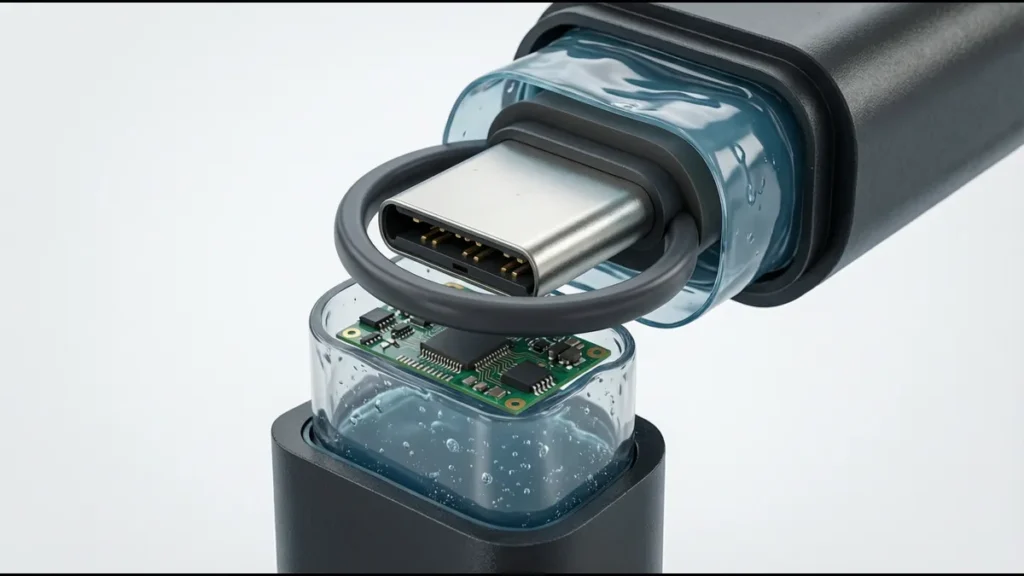
Making a USB connector waterproof is not a single action — it’s a system of sealing interfaces that work together to prevent water from reaching the electrical contacts. A USB connector has multiple potential water entry paths: through the panel cutout, through the plug-to-receptacle gap, through the contact-to-housing interface, and along the contact pins to the PCB. Each path requires a different sealing method.
This guide covers the practical methods for waterproofing USB connectors, from selecting a pre-sealed connector to adding waterproofing to an existing design, along with the standards that define what “waterproof” actually means.
Understanding the Water Entry Paths
Before selecting a waterproofing method, identify where water can enter. A panel-mount USB connector has four potential leakage paths:
Path 1: Panel Cutout Interface
Water enters the gap between the connector flange and the enclosure panel. This is the most common leakage path because the panel cutout is rarely perfectly smooth and the connector flange may not be perfectly flat.
Sealing method: Panel gasket between flange and panel.
Path 2: Plug-to-Receptacle Interface
Water enters through the gap between the inserted USB plug and the receptacle port opening. This gap exists because USB plugs are not designed for sealing — they have square corners, rectangular cross-sections, and tolerances that leave 0.1–0.3mm of clearance.
Sealing method: Radial seal (compression ring or overmolded boot).
Path 3: Contact-to-Housing Interface
Water travels along the contact pins, through the housing, to the PCB. The contact pins pass through the housing with a press-fit or overmolded interface that is not inherently watertight.
Sealing method: Epoxy potting or overmolding of the contact area.
Path 4: Housing Permeation
Under prolonged submersion, water can permeate through the plastic housing material itself. PBT absorbs up to 0.2% moisture by weight; over weeks of submersion, this is enough to cause leakage.
Sealing method: Use low-permeability housing material (LCP, PPS).
Method 1: Pre-Sealed Connector (Recommended)
The most reliable approach is to use a connector that is designed and manufactured as waterproof. These connectors integrate all sealing interfaces at the factory:
What a Pre-Sealed Connector Includes
| Component | Sealing Function | Material Options |
|---|---|---|
| Panel gasket | Seals flange-to-panel interface | Silicone, EPDM, fluorosilicone |
| Radial seal | Seals plug-to-receptacle gap | Silicone ring or overmolded boot |
| Internal potting | Seals contact-to-housing interface | Two-part epoxy |
| Housing material | Prevents permeation | LCP or PPS |
| Optional: sealing cap | Seals unmated port | Same material as panel gasket |
Advantages
- Factory-tested sealing (100% air leak test)
- Integrated design — all sealing interfaces are engineered to work together
- Known IP rating with test data
- No additional assembly steps required
Disadvantages
- Higher cost ($1.20–$3.00 for IP67 USB-C vs $0.12–$0.25 for standard)
- Limited connector type availability (not all USB connector types have waterproof versions)
- May require a custom cable with overmolded sealing boot for full IP rating
When to Use
- New product design where the connector can be specified from the start
- Applications requiring guaranteed IP rating with test data
- Volume production where assembly consistency is critical
Method 2: Add-On Panel Gasket
If you’re using a standard (non-sealed) USB connector and need to improve its panel sealing, an add-on gasket can seal the panel interface. This addresses Path 1 only — it does not seal the plug-to-receptacle or contact-to-housing interfaces.
Gasket Design
| Parameter | Specification | Reason |
|---|---|---|
| Material | Silicone (50–60 Shore A) | Wide temperature range, good compression set |
| Thickness | 1–2mm | Provides enough compression to fill surface irregularities |
| Compression | 15–30% of thickness | Enough to seal without over-compressing |
| Inner diameter | Matches connector flange OD | Snug fit around connector body |
| Outer diameter | Extends 2–3mm beyond panel cutout | Full coverage of cutout edge |
Installation
- Clean the panel surface and connector flange with isopropyl alcohol
- Place the gasket over the connector flange (or on the panel, depending on design)
- Mount the connector to the panel, compressing the gasket
- Tighten mounting hardware to the torque specified by the connector manufacturer
- Verify gasket compression is uniform (visual inspection — gasket should be visibly compressed around the full perimeter)
Limitations
- Seals only the panel interface, not the plug-to-receptacle gap
- Cannot achieve better than IP65 without additional sealing methods
- Gasket may degrade over time (UV, temperature, chemical exposure)
- Panel surface quality affects seal quality — rough or painted surfaces may leak
Method 3: Conformal Coating and Potting
For connectors already soldered to a PCB, conformal coating and potting can seal the contact-to-housing interface (Path 3) and protect the PCB from moisture.
Conformal Coating
Conformal coating is a thin (25–75µm) polymer film applied to the PCB surface around the connector. It protects against moisture, dust, and chemical contamination but does not fill gaps — it coats surfaces.
| Coating Type | Thickness | Temperature Range | Moisture Protection | Reworkability |
|---|---|---|---|---|
| Acrylic | 25–75µm | −40°C to +125°C | Moderate | Easy (solvent removable) |
| Silicone | 50–200µm | −55°C to +200°C | Good | Moderate (difficult to remove) |
| Polyurethane | 25–75µm | −40°C to +125°C | Good | Difficult |
| Epoxy | 50–150µm | −40°C to +150°C | Excellent | Very difficult (permanent) |
| Parylene | 1–50µm | −40°C to +150°C | Excellent | Impossible (vapor deposited) |
Application to USB connectors: Conformal coating should not be applied to the contact surfaces (mating area) — it would prevent electrical contact. Apply coating to the PCB area surrounding the connector, the solder joints, and the connector body (avoiding the port opening). This protects the PCB and solder joints from moisture but does not seal the port itself.
Epoxy Potting
Potting fills the rear of the connector (the through-hole or SMT contact area) with epoxy, creating a solid barrier that prevents water from traveling along contact pins to the PCB.
Procedure:
- After soldering the connector to the PCB, clean the area with isopropyl alcohol
- Mask the connector port opening (to prevent epoxy from entering the port)
- Mix two-part epoxy (potting-grade, low-viscosity, thermally matched to connector housing CTE)
- Apply epoxy to the rear contact area, filling all gaps between contacts and housing
- Cure per epoxy specification (typically 24 hours at room temperature or 2 hours at 80°C)
- Remove masking and inspect for voids or incomplete fill
Epoxy selection criteria:
- Viscosity: 500–3,000 cP (low enough to flow into gaps, high enough to stay in place)
- Shore hardness after cure: 70–90D (rigid enough to seal, not so brittle it cracks under thermal stress)
- CTE: 20–40 ppm/°C (should be close to the connector housing CTE to avoid stress during thermal cycling)
- Operating temperature: ≥ the connector’s operating temperature
- Adhesion to housing material: verify compatibility (some epoxies don’t adhere well to LCP)
Limitations of Potting
- Adds assembly step and curing time
- Makes rework extremely difficult (potting must be removed to access solder joints)
- May not seal the plug-to-receptacle interface (Path 2)
- Voids in the potting (trapped air bubbles) create leakage paths — vacuum degassing before application is recommended
Method 4: Overmolded Cable Boot
The most challenging seal in a USB connector system is the plug-to-receptacle interface (Path 2). Standard USB plugs have clearance between the plug body and the receptacle port — this gap allows water to enter. The solution is an overmolded boot on the cable plug that creates a sealing surface against the receptacle.
How It Works
- The USB cable plug is overmolded with a rubber or silicone boot that extends beyond the standard plug body
- The boot has a tapered or stepped outer diameter that matches the receptacle port opening
- When the plug is inserted, the boot compresses against the receptacle port wall, creating a radial seal
- The seal prevents water from entering the gap between the plug and receptacle
Boot Design Parameters
| Parameter | Specification | Reason |
|---|---|---|
| Boot material | Silicone (50–60 Shore A) or TPU | Flexibility for compression, durability for repeated mating |
| Interference fit | 0.2–0.5mm (boot OD is 0.2–0.5mm larger than port ID) | Creates compression seal without excessive insertion force |
| Taper angle | 5–10° | Allows smooth insertion while maintaining seal |
| Boot length | 8–15mm | Long enough for full seal engagement |
| Surface finish | Smooth (Ra < 1.6µm) | Rough surfaces create leakage paths |
Advantages
- Achieves IP67+ sealing with standard receptacle geometry (no custom port required)
- Allows use of standard USB cable internals (only the overmold is custom)
- Boot can be color-coded for identification (red for waterproof, black for standard)
Disadvantages
- Requires custom cable — standard USB cables don’t have the sealing boot
- Increases insertion force by 5–15N (the boot compression adds resistance)
- Boot may wear over repeated mating cycles — specify boot replacement interval
- Boot material may degrade in UV or chemical exposure
Method 5: Enclosure Design for Waterproofing
The enclosure surrounding the USB connector is as important as the connector itself. A waterproof connector in a non-waterproof enclosure provides no protection.
Enclosure Requirements
| Requirement | Specification | Reason |
|---|---|---|
| Enclosure IP rating | ≥ the connector IP rating | The enclosure is the primary barrier |
| Panel cutout tolerance | ±0.1mm | Oversize cutout prevents gasket sealing |
| Panel surface finish | Ra < 3.2µm | Rough surfaces create leakage paths |
| Panel thickness | ≥ 1.5mm (metal) or ≥ 3mm (plastic) | Thin panels flex under gasket compression, causing uneven sealing |
| Panel material | Must be compatible with gasket material | Some plastics react with silicone (plasticizer migration) |
| Drainage | Provide drainage paths below the connector | Prevents water pooling at the connector |
Panel Cutout Preparation
- Deburr the cutout: Remove all burrs and sharp edges from the cutout. Burrs create leakage paths and can cut the gasket.
- Clean the surface: Remove all oil, dust, and debris from the panel surface and the connector flange. Use isopropyl alcohol.
- Verify flatness: The panel surface around the cutout should be flat to within 0.1mm. Warped or dished panels create uneven gasket compression.
- Paint/masking: If the panel is painted, ensure paint is fully cured before installing the connector. Uncured paint contains solvents that degrade gasket materials. Mask the gasket contact area before painting to ensure bare metal or consistent coating thickness.
- Gasket groove (optional): For the most reliable sealing, machine a gasket groove into the panel. The groove locates the gasket precisely and provides a defined compression stop, preventing over-compression.
Waterproofing Standards Reference
IEC 60529 (IP Code)
The primary standard for ingress protection. Defines the IP rating system used worldwide.
ISO 20653
Road vehicles — Degrees of protection (IP code) — Protection of electrical equipment against foreign objects, water, and access. Essentially identical to IEC 60529 but specific to automotive applications.
UL 50E
Enclosures for electrical equipment, non-environmental considerations. Includes water exposure tests similar to IP ratings but with UL-specific pass criteria.
MIL-STD-810
Environmental engineering considerations and laboratory tests. Method 512.6 (Immersion) and Method 506.7 (Rain) provide military-grade waterproofing test methods. More stringent than IEC 60529.
USB-IF Water Resistance Guidelines
USB-IF does not define a waterproof USB standard, but the USB Type-C specification includes dimensional tolerances that affect sealing compatibility. A USB-C connector that meets USB-IF dimensional specs can be sealed to IP67/IP68 with appropriate gasket design.
Testing Your Waterproofing
DIY Test (Pre-Certification)
For initial validation before formal certification testing:
- Install the connector in a test panel using production-equivalent hardware and torque.
- Mate a plug (or install a sealing cap for unmated testing).
- Submerge in a water tank at the target depth (1m for IP67, deeper for IP68).
- Wait for the rated duration (30 min for IP67, longer for IP68).
- Remove, dry, and inspect. Look for water inside the connector, on the contacts, or on the PCB side.
- Dielectric test: Apply 500V AC between contacts and shell for 1 minute. No breakdown or flashover.
What Constitutes Failure
- Any visible water inside the connector body
- Water on the contact surfaces
- Water on the PCB-side contact tails
- Dielectric breakdown during the 500V test
- Contact resistance change > 10mΩ after testing
Common Test Failures and Causes
| Failure | Likely Cause | Fix |
|---|---|---|
| Water at panel interface | Gasket not compressed enough, panel surface rough, cutout oversize | Increase compression, smooth panel, verify cutout size |
| Water at plug interface | Boot not properly sized, plug not fully inserted, boot worn | Check boot dimensions, verify full insertion, replace boot |
| Water at contact tails | Potting void, insufficient potting coverage | Re-pot with vacuum degassing, ensure full coverage |
| Dielectric failure | Water in contact area, potting breakdown | Locate water entry path, improve sealing at that interface |
Maintenance of Waterproof Connectors
Waterproof connectors are not maintenance-free. Over time, gaskets age, compress, and degrade, reducing the seal effectiveness.
Inspection Schedule
| Application | Inspection Interval | What to Check |
|---|---|---|
| Outdoor (non-submersed) | Annual | Gasket compression, cracking, UV degradation |
| Washdown (food/beverage) | 6 months | Gasket compression, chemical degradation, boot wear |
| Marine (submersed) | 3–6 months | Gasket condition, corrosion on shell, boot wear |
| Industrial (occasional exposure) | Annual | Gasket condition, panel seal integrity |
Gasket Replacement
| Gasket Material | Typical Replacement Interval | Degradation Indicators |
|---|---|---|
| Silicone | 3–5 years | Cracking, hardening, compression set > 30% |
| Fluorosilicone | 3–5 years | Swelling, softening, chemical attack |
| EPDM | 2–4 years | Cracking, UV degradation, compression set |
| Viton | 5–7 years | Hardening, chemical degradation |
Replace gaskets at the specified interval or when degradation is visible, whichever comes first. Keep spare gaskets in stock — the connector is not waterproof without a functional gasket.
Cost Comparison of Waterproofing Methods
| Method | Added Cost per Connector | IP Rating Achievable | Assembly Complexity |
|---|---|---|---|
| Pre-sealed connector (factory) | $1.00–$2.50 | IP67–IP68 | None (drop-in replacement) |
| Add-on panel gasket | $0.05–$0.15 | IP54–IP65 | Low (install gasket during assembly) |
| Conformal coating (PCB area) | $0.10–$0.30 | IP54 (with gasket) | Medium (coating process, masking) |
| Epoxy potting (contact area) | $0.15–$0.40 | IP65–IP67 (with gasket) | Medium (mix, apply, cure) |
| Overmolded cable boot | $0.30–$0.80 per cable | IP67 (mated condition) | Medium (custom cable required) |
| Full system (gasket + potting + boot) | $0.50–$1.50 | IP67–IP68 | High (multiple processes) |
The pre-sealed connector approach is the most cost-effective when the connector can be specified at the design stage. Retrofitting waterproofing to a standard connector costs less per unit but requires more assembly steps and may not achieve the same IP rating.
Related Reading: IP67 vs IP68 rating guide · waterproof stacked USB connectors · industrial USB connector guide · automotive-grade stacked USB connector