
Panel Mount USB Connector: Complete Selection Guide
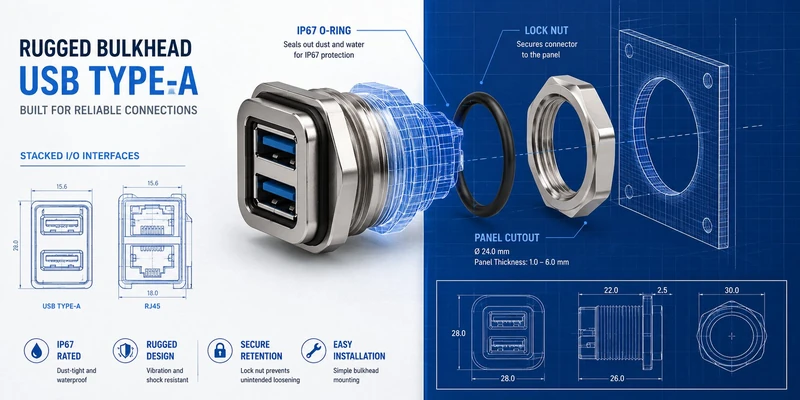
A panel mount USB connector does something different from a PCB-mounted connector: it bridges the inside of an enclosure to the outside world. The connector installs in a cutout on a metal or plastic panel, presents a flush or near-flush receptacle to the user or technician on the outside, and connects to the PCB or cable assembly inside. That interface position — between environment and electronics — defines everything about how it must be specified.
This guide covers panel mount USB connector types, mechanical mounting configurations, IP ratings, and selection criteria for server racks, industrial enclosures, test equipment, and outdoor deployments.
What Defines a Panel Mount USB Connector
Panel mount USB connectors differ from standard PCB-mounted receptacles in three ways:
| Characteristic | PCB Mount | Panel Mount |
|---|---|---|
| Mounting method | Soldered to PCB (SMT or through-hole) | Bolted or snap-fit to panel cutout |
| Mating side | Always accessible from outside PCB | Faces outward through panel; mating plug comes from external world |
| Cable/PCB connection | Direct solder | Flying lead, pigtail, or rear connector |
| Environmental sealing | None | Optional — IP67/IP68 achievable with flange seal |
| Replacement | Requires PCB access | Can be replaced at panel without opening PCB assembly |
The panel becomes the mechanical host for the connector. The connector’s flange or lock nut transfers mating forces directly to the panel, not to solder joints. This is the fundamental advantage of panel mount designs: high mating cycle life with mechanical loads going to metal panel, not to a PCB.
Panel Mount USB Connector Types
USB Type-A Panel Mount
The most common panel mount configuration. The USB Type-A receptacle installs in a rectangular cutout or a circular cutout (with adapter ring):
Flange Mount (D-sub style)
– Rectangular flange with M2 or M3 mounting holes
– Installs from inside panel, flange contacts panel face
– Standard cutout: 13.0 × 7.5 mm (USB Type-A opening)
– Typical panel thickness: 1–4 mm
– IP Rating: IP20 (no sealing); IP67 achievable with front-face seal gasket
Bulkhead Mount (Circular, threaded)
– Circular body with external thread (typically M16, M19, or M24)
– Installs through circular hole, secured with lock nut from inside panel
– More rugged than flange — circular geometry distributes stress evenly
– Panel thickness range: 1–8 mm (determined by thread engagement length)
– IP Rating: IP67 standard with O-ring; IP68 with compressed O-ring variants
Push-Pull Panel Mount
– Square or rectangular body with positive push-pull latch
– Tool-free insertion and extraction with audible click
– Common in test and measurement equipment where frequent cable changes are expected
– Mating cycles: 5,000–10,000 (vs. 1,500 for friction-only)
USB Type-C Panel Mount
Type-C panel mount connectors are increasingly common in:
– Portable test equipment (replacing Type-B Mini which was standard for 15+ years)
– Industrial HMI displays with USB-C video input
– EV charging auxiliaries (low-voltage data USB alongside high-voltage charging)
– Next-generation server management ports (AST2700 platforms)
Type-C panel mount configurations:
| Configuration | Body Style | Notes |
|---|---|---|
| Flange mount | Rectangular flange, 4-hole | Smaller cutout than Type-A (8.94 × 3.26 mm plug face) |
| Bulkhead M14 | Circular M14 thread | Smaller diameter than M16 Type-A |
| IP68 sealed | O-ring + cover cap | Common for outdoor/IP-rated applications |
| Locking Type-C | Screw-lock ring | Prevents accidental disconnection in vibration environments |
USB Type-B Panel Mount (Legacy)
USB Type-B square connector remains common on:
– Industrial printers and label makers
– Laboratory instruments
– CNC machine USB-B programming ports
– Audio/MIDI interfaces
Panel mount Type-B uses the same flange/bulkhead configurations as Type-A, with a different cutout geometry (8.45 × 7.26 mm for the standard Type-B plug face).
Mini USB and Micro USB Panel Mount
Mini USB panel mount connectors are found in older equipment still in production or requiring spare parts. Micro USB panel mount connectors appear in:
– Remote monitoring equipment with low form-factor constraints
– Legacy industrial handhelds
– Applications where cost constraints prevented Type-C adoption
Both are available in flange and bulkhead configurations, though the smaller plug size makes bulkhead designs more common (the circular seal is mechanically simpler for small connectors).
Mounting Methods Compared
Flange Mount
[Panel face]  [Flange]  [Connector body]  [PCB or cable]
    |              |           |                |
 cutout      M3 screws    solder tail      PCB or pigtail
Advantages:
– Rectangular geometry matches standard panel cutout shapes
– Multi-hole mounting distributes forces
– Standard panel shop tooling (rectangular punch or CNC mill)
Disadvantages:
– Less vibration-resistant than bulkhead (screws can loosen)
– Limited panel thickness range without spacer hardware
– Larger panel area consumed by flange footprint
Best for: Office equipment, test instruments, control panels in benign environments
Bulkhead / Threaded Lock Nut
[Panel face]  [O-ring]  [Connector body]  [Lock nut]  [Cable inside]
    |              |           |              |
 circular     IP sealing   through panel   tightened   pigtail/cable
  cutout                                   from inside
Advantages:
– Circular cutout is faster to machine (single hole punch or step drill)
– Excellent vibration resistance — thread engagement is continuous around circumference
– IP67/IP68 achievable with O-ring seal between flange and panel face
– Easy replacement: loosen lock nut, pull connector out from front
Disadvantages:
– Higher cost than flange mount
– Requires back-of-panel access for lock nut installation
Best for: Industrial enclosures, outdoor equipment, military and defense, server rear I/O panels
Snap-Fit / Panel Clip
Some panel mount connectors use snap-fit retention — plastic or metal clips that engage the panel cutout from behind. Simpler to install, but lower retention force (typically < 20N extraction) limits use to applications without vibration or cable tension.
Best for: Consumer products, light commercial equipment, applications where tool-free installation is required
IP Ratings for Panel Mount USB Connectors
Panel mount connectors with sealing are rated to IEC 60529:
| IP Rating | Dust Protection | Water Protection | Typical Application |
|---|---|---|---|
| IP20 | Protected from >12mm solid objects | No water protection | Standard indoor panels |
| IP40 | Protected from >1mm objects (no dust seal) | No water protection | Control panels, not splashed |
| IP54 | Dust protected (not total exclusion) | Splash resistant (all directions) | Outdoor kiosks, mild wash-down |
| IP65 | Dust tight (total exclusion) | Water jet resistant (6.3 mm nozzle) | Factory floors, light wash-down |
| IP67 | Dust tight | Temporary immersion up to 1m for 30 minutes | Outdoor handheld, agricultural, marine |
| IP68 | Dust tight | Continuous immersion per manufacturer specification | Underwater ROVs, submersible equipment |
Note: IP ratings apply to the mated condition (plug inserted) unless the connector has a protective cap for the unmated state. An IP67 USB panel mount connector without a plug or cap is typically IP20 unmated — the internal contacts are exposed.
For applications where the port is frequently unmated (e.g., a server management port that is accessed only during maintenance), a protective cap is essential:
| Cap Type | IP Rating Retained | Ease of Use |
|---|---|---|
| Friction cap (molded plug) | IP67 | Low — can be lost |
| Captive cap with chain | IP67 | Medium — inconvenient for frequent use |
| Flip cap (spring loaded, IP54) | IP54 | High — returns to closed automatically |
| Dust cap (no sealing) | Dust only, no water | Best — adequate for indoor environments |
Panel Cutout and Hardware Specifications
Standard Panel Cutout Dimensions
| Connector Type | Flange Mount Cutout | Bulkhead Drill Size | Thread |
|---|---|---|---|
| USB Type-A | 13.0 × 7.5 mm | ∅15.0–16.0 mm | M16 |
| USB Type-C | 9.0 × 4.0 mm | ∅13.0–14.0 mm | M14 |
| USB Type-B | 10.0 × 8.0 mm | ∅15.0–16.0 mm | M16 |
| Micro USB | 7.5 × 3.0 mm | ∅11.0–12.0 mm | M12 |
| Dual stacked USB-A | 13.0 × 16.0 mm | ∅19.0–20.0 mm | M20 |
| USB-A + RJ45 combo | 23.0 × 16.0 mm | N/A (rectangular only) | — |
Panel Material Considerations
| Panel Material | Suitable Mount Types | Special Requirements |
|---|---|---|
| 1.5mm steel (SPCC) | All types | Standard hardware |
| 3mm aluminum | All types; bulkhead preferred | Standard hardware |
| 6mm stainless (SUS304/316) | Bulkhead strongly preferred | Extended thread engagement; may require reducing bushing |
| 3mm plastic (ABS/PC) | Flange or snap-fit | Avoid bulkhead — crush risk; use backing plate for flange |
| 6mm fiberglass (GRP) | Flange with washer | Torque limit; use nylon washer to prevent cracking |
Panel Mount USB Selection for Specific Applications
Server Rack Management Panel
Server rear I/O panels use panel mount USB connectors to present the BMC management port through the chassis sheet metal. Requirements:
| Parameter | Specification |
|---|---|
| Connector type | USB Type-A (USB 2.0 for AST2500/2600); consider Type-C for AST2700 |
| Mounting | Flange mount on 1.5–2mm SPCC rear panel |
| IP rating | IP20 — standard server room; no water sealing required |
| Mating cycles | 1,500 minimum; 5,000 preferred |
| Contact plating | Gold over nickel, 15µ” minimum |
| Stacking option | USB-A stacked over RJ45 for combined management port |
| Cable | Short pigtail to PCB header, or direct SMT with flex PCB |
For stacked USB+RJ45 server panel mount connectors, see the RJ45+USB Combo Jack guide and the Server BMC USB Connector guide.
Industrial Equipment Panel (Factory Floor)
| Parameter | Specification |
|---|---|
| Connector type | USB Type-A or Type-B, depending on equipment side |
| Mounting | Bulkhead M16 with O-ring |
| IP rating | IP65 (dust tight, water jet resistant) — minimum for factory floor |
| Operating temperature | −20°C to +85°C |
| Shell material | SUS316L stainless for chemical resistance |
| Mating cycles | 5,000+ (operators connect and disconnect frequently) |
| Cable | Oil-resistant PUR cable; avoid PVC in contact with cutting fluids |
Outdoor / Public Access Kiosk
| Parameter | Specification |
|---|---|
| Connector type | USB Type-A or Type-C |
| Mounting | Bulkhead M16 or M14 with stainless lock nut |
| IP rating | IP66 (high-pressure jet resistant) or IP67 for rain-exposure locations |
| Vandal resistance | Stainless housing, no plastic exposed; internal cable clamping |
| Mating cycles | 10,000+ (public access) |
| Anti-tampering | Consider recess or bezel to prevent prying or cable tying |
Test and Measurement Equipment
| Parameter | Specification |
|---|---|
| Connector type | USB Type-A, Type-B, or Type-C depending on DUT connectivity |
| Mounting | Flange mount on aluminum front panel |
| IP rating | IP20 standard for lab; IP54 for field test equipment |
| Mating cycles | 5,000+ — frequent cable changes in production test environments |
| Configuration | Consider push-pull locking for cable that is removed between tests |
Panel Mount vs. Cable Assembly Mount
Some applications use a cable assembly with a panel-side female plug rather than a panel-mount receptacle. Comparing the approaches:
| Approach | Advantages | Disadvantages | Best Use |
|---|---|---|---|
| Panel mount receptacle | Clean panel appearance; field-replaceable; any cable works | Requires panel cutout; slightly higher cost | Fixed installations |
| Cable assembly with panel hole | No cutout machining; strain relief integral | Cable is fixed; pigtail can fatigue over time; harder to replace | Low-change-rate connections |
| Feedthrough coupler | Pass-through for cable-to-cable; IP-rated possible | Adds length; two mating interfaces | Through-wall routing |
For server and industrial applications, a panel mount receptacle is almost always the right choice. The ability to replace a damaged connector at the panel — without accessing the PCB interior — justifies the machining cost.
Installation Best Practices
Torque for Bulkhead Lock Nuts
Over-torquing a lock nut crushes the O-ring and deforms the connector body. Under-torquing allows rotation and breaks the IP seal.
| Connector Size | Recommended Torque | Notes |
|---|---|---|
| M12 | 0.5–0.8 N·m | Light hand-tighten only |
| M14 | 0.8–1.2 N·m | 1/8 turn past finger-tight |
| M16 | 1.0–1.5 N·m | 1/8 turn past finger-tight |
| M20 | 1.5–2.0 N·m | Wrench required; use torque wrench |
| M24 | 2.0–3.0 N·m | Wrench required |
Apply a thin layer of dielectric grease to the O-ring before installation — reduces compression set over time, maintains IP rating through thermal cycling.
Rear Cable Management
Panel mount connectors with pigtails or cable assemblies inside the enclosure require strain relief planning:
- Minimum bend radius for standard USB cable: 10× cable diameter (typically 35–50 mm)
- Vibration environments: add a secondary tie point on the cable 50–75 mm from the connector
- For rotating or pivoting panels: add a cable loop with adequate slack; never route cable that is taut when the panel is at its maximum opening angle
Summary
Panel mount USB connectors turn a sheet metal panel into a structured interface point. The choice of mounting type (flange vs. bulkhead), IP rating, and connector form factor should match the environment and access pattern rather than defaulting to the cheapest option:
- Flange mount: standard indoor panels, office and lab equipment
- Bulkhead with O-ring: industrial and outdoor applications requiring IP65 or higher
- USB 2.0 Type-A: server management ports, industrial equipment with legacy USB interface
- USB Type-C: new designs targeting forward compatibility; required for AST2700 platforms
- IP67/IP68: outdoor kiosks, agricultural equipment, marine, and wash-down environments
The connector at the panel is also the point of highest mechanical stress — from mating, cable weight, and vibration. Specifying for this point correctly prevents field failures that are expensive to diagnose and repair when the equipment is deployed in a remote location.
Related reading: Industrial USB Connectors: Rugged Design Guide | IP67 vs IP68 USB Connector Rating Guide | How to Waterproof a USB Connector
GSConn panel mount USB connectors are available in Type-A, Type-C, and combo stacked configurations. Standard and custom flange geometries, M12 through M24 bulkhead threads, IP20 through IP68 ratings. Inquire for datasheets and samples.
GSConn supplies panel mount USB Type-A, USB Type-C, USB 3.0, and stacked USB+RJ45 connectors for server racks, industrial enclosures, test equipment, and outdoor kiosks. Our panel mount portfolio includes flange-mount and M16/M14 bulkhead variants, IP67/IP68 sealed options for outdoor deployments, and IP20-rated versions for indoor equipment racks. Standard cutout dimensions and metric thread options are available for drop-in replacement of common industry footprints. Custom cable pigtail lengths, panel-mounting gasket materials (silicone, EPDM), and plating thickness (15–50 µ”) are provided for OEM integration.
Related Reading: Industrial USB Connector Guide · IP67 vs IP68 USB Connector Rating Guide · How to Waterproof a USB Connector · RJ45+USB Combo Jack Reference · Locking USB Connector Guide